Publishing a space
How to put your space on Spacement, which fields decide whether you get enquiries, and what happens between submitting and going live.
· مدة القراءة 3 دقيقة
هذا الدليل متاح بالألمانية والإنجليزية. أنت تقرأ النسخة الإنجليزية.
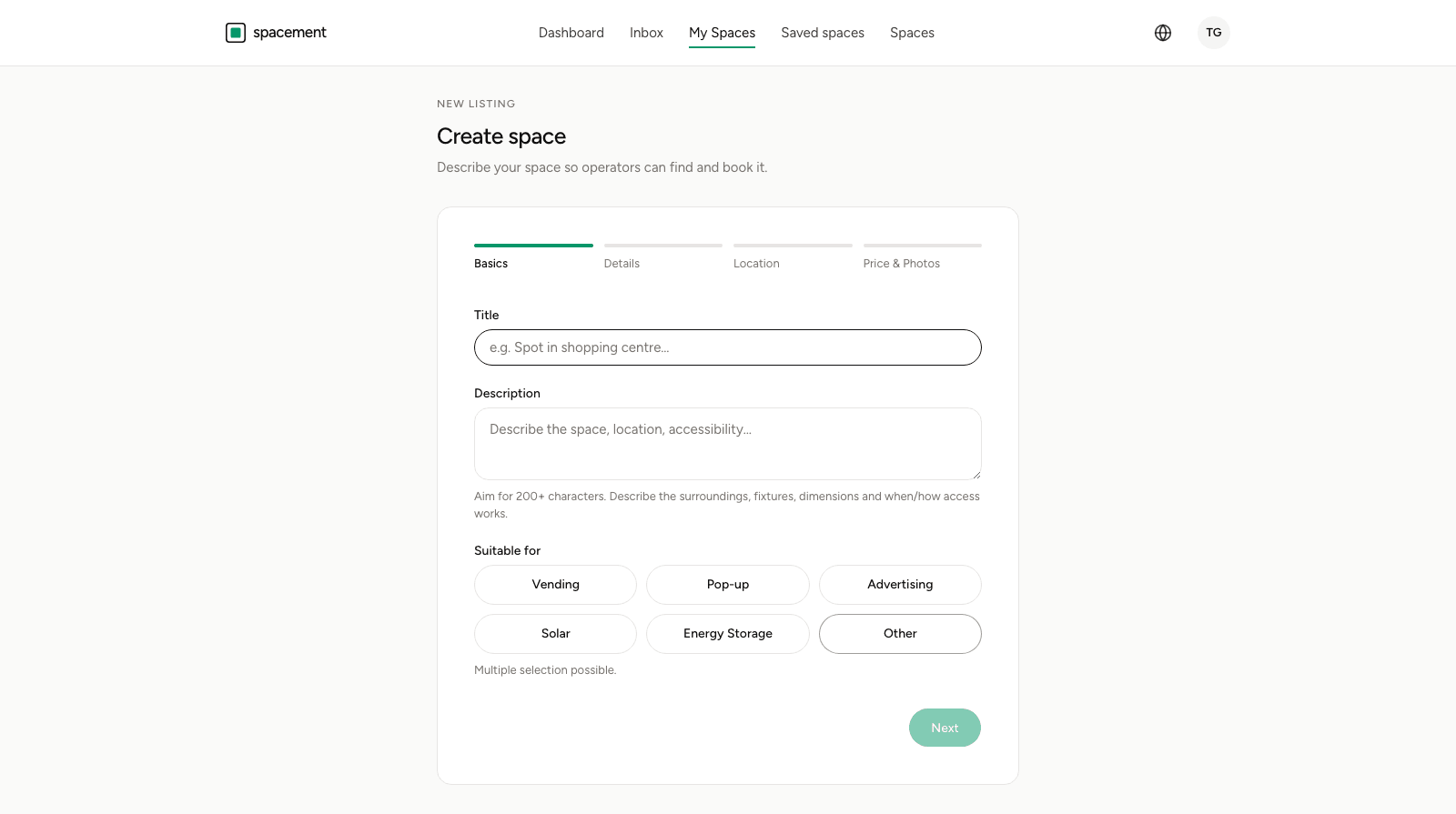
You publish spaces from My spaces, using the New Space button. The form walks you through four steps, and the listing goes into review at the end. For you as a host, all of this is free.
The four steps
The steps are Basics, Details, Location and Price & Photos. You can move back and forth between them, and if you stop halfway, your draft is waiting the next time you come back. Photos are not kept in that draft, so you upload those again after an interruption.
- Basics: title, description, and what the space is suitable for. The use types are a multiple choice, from vending machine spot through pop-up to advertising, solar and battery storage.
- Details: size, connections, access. What gets asked here depends on the use types you picked in step one. An advertising space is asked about lighting, a roof about orientation and grid connection.
- Location: the address. It is needed to place the space on the map, but it is not public. Anyone who has not unlocked the space sees only the city and an approximate circle.
- Price & Photos: the monthly price and the images.
The fields that decide whether you get enquiries
Three of them carry most of the weight.
The description. Two hundred characters is a reasonable floor. What helps is whatever an operator would otherwise have to ask: the surroundings, the dimensions, the fittings, and when and how the space can be accessed. A listing that answers those questions gets more specific enquiries.
The photos. Three at least, ten at most. Bright shots that show the space itself rather than the building from across the street. Large files are compressed on upload, so there is nothing to prepare.
The price. There is a Price on request option, and sometimes there is no way around it. Listings without a fixed price tend to attract fewer enquiries. If you would rather not commit, a guide price still beats saying nothing.
Contact details are optional
At the end of the form you can add a name, email address, phone number and website. Those are visible only to operators with active access, and only after they have unlocked your space.
Leave the fields empty if you would rather not be called directly. Every enquiry then runs through Spacement's messaging system, and you decide during the conversation when to hand over more.
What happens after you submit
Every new listing is reviewed by hand before it appears in the directory. That usually takes less than 24 hours, and you get an email as soon as the space is live.
Under My spaces you can see where it stands in the meantime:
- Pending approval: submitted, not yet reviewed.
- Active: visible in the directory.
- Paused: hidden by you.
- Suspended: taken down by us, with a stated reason.
- Rejected: the images did not pass a content check.
Pause rather than delete
If a space is unavailable for a while, use Pause instead of deleting it. It disappears from the directory and from search but stays yours. Resume puts it straight back, with no second trip through review.
Deleting is for when the space should be gone for good. It cannot be undone.
After that
Enquiries reach you by email and in your inbox under Messages. Which notifications you get is up to you, and Notifications and language covers where to set that.
الأسئلة الشائعة
- Does listing cost me anything?
- No. Hosts publish their spaces free of charge and never pay Spacement anything. Payment happens on the operator side, for access to the directory.
- How long does approval take?
- Usually less than 24 hours. You get an email once your space is live. Until then it sits under My spaces marked Pending approval.
- Do I have to state a price?
- No, there is a Price on request option. Listings without a fixed price tend to attract fewer enquiries, though. A guide price is better than none at all.
- Who can see my contact details?
- Only operators with active access, and only after they have unlocked your space. If you leave the contact fields empty, enquiries reach you through the internal messaging system alone.
- Can I hide a space temporarily?
- Yes, with Pause. The space disappears from the directory and comes back when you resume it, without going through approval again.