
How the review of new listings works
Why every new space is looked at by hand, how long it takes, what it can fail on, and the difference between rejected and suspended.
· Lukuaika 4 min
Tämä opas on saatavilla saksaksi ja englanniksi. Luet nyt englanninkielistä versiota.
Every new space is looked at by hand before it appears in the directory. That costs you less than a day as a rule, and it costs the directory the listings that serve nobody.
Why there is a review at all
A directory lives on its entries holding up. Operators pay for access to contact details, and if every second contact leads nowhere, the access is worth nothing. The review is the price of the other side being able to rely on what is written.
That is why it is manual. An automatic filter would catch formal errors and wave the rest through.
What happens in the meantime
After you submit, your space sits under My spaces in the Pending tab, with a tag on the listing.
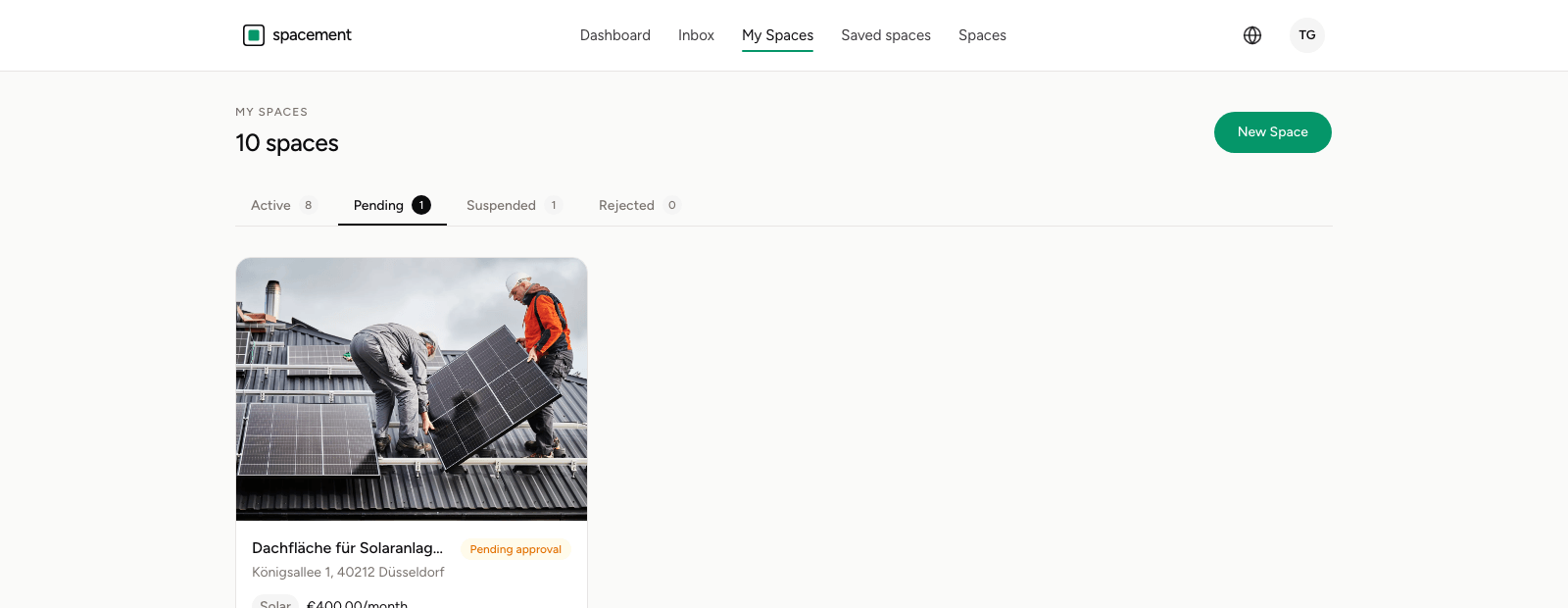
During that time it is visible to nobody but you. You can keep editing it; that does not reset the review.
What it can hang on
The most common reasons for a query are unremarkable.
The description does not carry. Two sentences from which neither location nor fittings nor access emerge. That is not grounds for rejection, but it is grounds to ask, and that costs both sides time.
The photos do not show the space. A shot of the building from across the street, a stock image, a screenshot of a map. If nobody can see what is being let, the listing is not usable.
Details do not add up. A size that does not match the photos, a price that is obviously a typo, an address in a different town from the title.
The use type does not fit. A roof marked as pop-up lands in the wrong search results.
Images run through an automatic check as well
Independently of the editorial review, every uploaded image goes through an automatic check before it is stored at all. That is not a quality judgement but a safeguard any platform with image upload needs.
We use Microsoft's PhotoDNA Cloud Service for it, the industry standard for this purpose.
PhotoDNA does not look at an image and does not try to understand its content. It converts the image to greyscale, lays a grid over it, and derives a number from each cell. The result is a signature, a so-called robust hash.
That signature is compared against a database of signatures of known abuse material. What gets compared are numbers, not pictures. The method is deliberately insensitive to scaling, cropping, recompression or painting over parts of an image: an altered copy produces a similar signature and is still recognised.
Which also gives it a clear limit, and that matters for understanding it: the method finds known material. It does not judge what is in your photograph and draws no conclusions about you. A photo of an empty warehouse produces a signature like any other image, and that signature appears in no comparison database. Nothing further happens.
Where PhotoDNA confirms a match, Microsoft reports it to the relevant body on their side. That does not run through us.
Why an upload can fail without a match
The check is deliberately built to block when in doubt. If the service is unreachable or a file cannot be evaluated, the upload is rejected rather than stored unchecked.
So if an image does not go through for no apparent reason, that is almost always a technical fault rather than a suspicion. Try again in a few minutes, and if it persists, write to support.
Where the check does trigger, the listing is rejected, the gallery is replaced and the case is logged. That is the one state a space cannot come back from by improving it, and it has consequences for the account.
Rejected, suspended, paused
Three states that are easily confused.
Rejected concerns the image content check and is final.
Suspended means we took an already approved space down afterwards, with a reason shown on the card. That happens after a report, for instance. The way back runs through support, once what was named has been fixed.
Paused is your own decision and has nothing to do with review. All three are covered in Editing, pausing and deleting a space.
What you can do to make it quick
A complete listing goes through faster than a sparse one. A description with location, dimensions, fittings and access, at least three photos showing the space, and a use type that matches it.
That is not a formality: what holds a review up is follow-up questions, and those arise exactly where details are missing. How to build the listing is in Publishing a space, and what matters in text and images in Photos and descriptions.
Usein kysytyt kysymykset
- How long does approval take?
- Usually less than 24 hours. You get an email as soon as the space is live.
- Are changes to an approved space reviewed again?
- No. Review applies to new listings. Changes go live immediately, which is why they should be right when you save.
- What is the difference between rejected and suspended?
- Rejected means the images did not pass the content check. Suspended means we took an approved space down afterwards, with a stated reason.
- Can I speed the review up?
- Not directly. What helps is a complete listing: description, dimensions, usable photos. Follow-up questions cost more time than the review itself.
- Does anyone see my contact details during review?
- The review sees the listing. Access to account data requires a reason and is logged.
- What happens to my photos in the automatic image check?
- A signature is derived from each image and compared against signatures of known abuse material. The content itself is neither analysed nor judged.