
Setting notifications and language
The five kinds of message Spacement sends, how to switch them off per channel, and what automatic translation of listings actually does.
· 2 min. leestijd
Deze handleiding is beschikbaar in het Duits en Engels. Je leest nu de Engelse versie.
Both sit in your settings, next to each other: Notifications governs what reaches you, Language governs what language it arrives in.
The five categories
Spacement sends messages in five categories, and each has its own switch.
- Messages: somebody has written to you.
- My spaces: something about your listings changed, an approval for instance.
- Search agents: a new space matches one of your saved searches.
- Tips and reminders: occasional pointers about using the platform.
- Account and billing: sign-ins, changes to your access, payments.
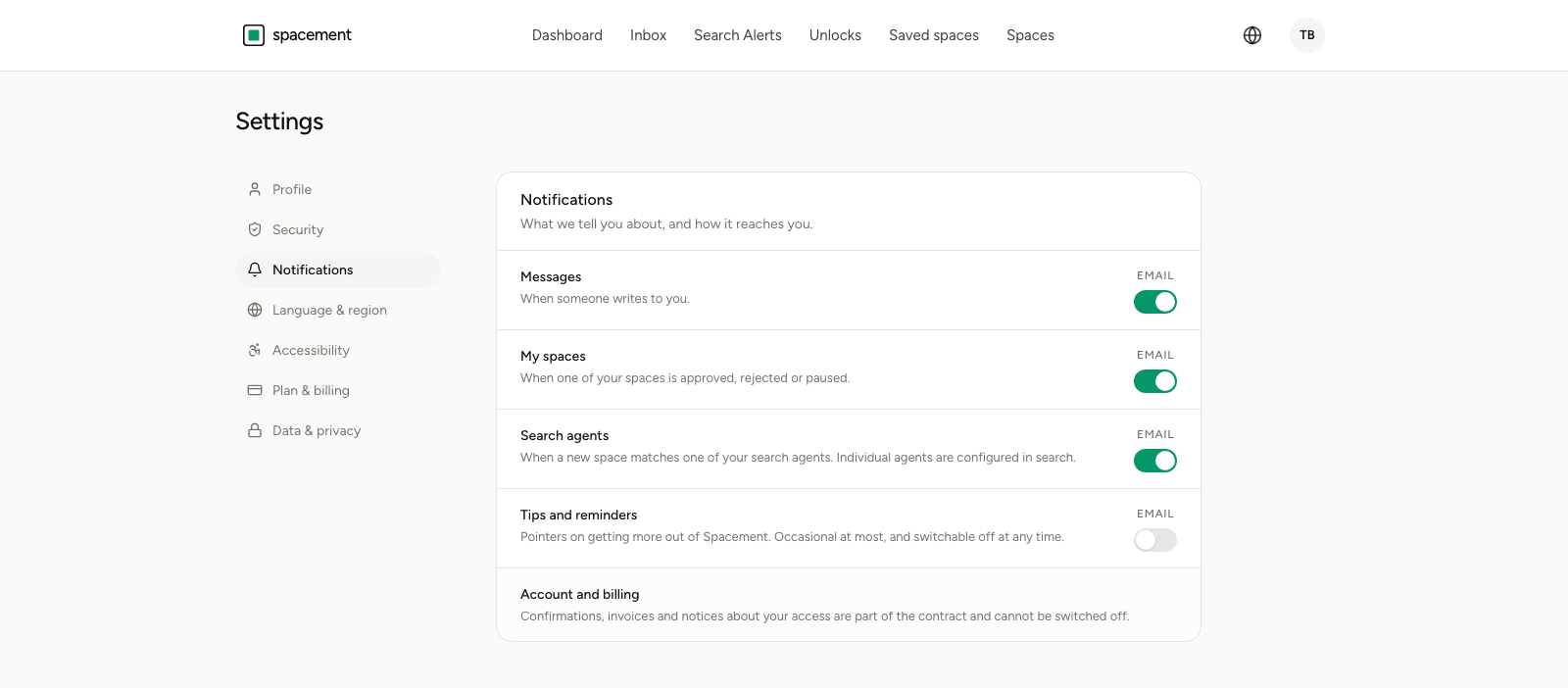
By default there is one column: email. A second one for App appears once you have the Spacement app installed and have allowed notifications. Without the app there is nothing to choose, because there is no device for a push notification to reach.
The Search agents category is a master switch. Turn it off and not a single agent reports anything, whatever you set on the individual agent. To quieten one particular agent, do it on the agent itself, as described in Creating a search agent.
What cannot be switched off
A few emails run regardless of these switches: confirming an email address, notices about security-relevant changes to your account, and anything to do with billing.
Those are not marketing emails but messages without which the account could not be run safely. Somebody whose password changes should hear about it, even with notifications off.
Language
Under Language & region you choose your account language. It applies on every device you are signed in on, and to the emails Spacement sends you. The interface exists in sixteen languages.
That is separate from the language a listing is written in. Hosts write those themselves, usually in their own.
Translating listings automatically
On the same page sits the Translate listings automatically switch. With it on, you see titles and descriptions of foreign-language listings in your own language. With it off, you see the host's original text.
Translation runs by machine through Microsoft Azure AI Translator. The host's text is stored unchanged; the translation is an additional version alongside it.
For the details inside a listing, the original is still worth a look. A machine translation is good enough to decide whether a space fits, but dimensions, access arrangements and anything that will end up in a contract are better settled directly with the host.
Veelgestelde vragen
- Can I switch off every email?
- Every email about your activity, yes. Security and billing emails keep coming, because they are part of running your account.
- Does the language setting affect emails too?
- Yes. Your chosen language applies to your account on every device and to the emails Spacement sends you.
- Who translates the listings?
- Translations are produced by machine using Microsoft Azure AI Translator. Nobody on the team reads along, and the host's original text is stored unchanged.
- What happens if I turn automatic translation off?
- You see titles and descriptions in whatever language the host wrote them in.
- Why is there no column for app notifications?
- Because no device is registered. The column appears once you have the Spacement app installed and have allowed notifications.