
Searching and filtering spaces
How the search page is laid out, what the quick filters and the filter dialog do, and why the map shows approximate circles instead of pins.
· 2 min. leestijd
Deze handleiding is beschikbaar in het Duits en Engels. Je leest nu de Engelse versie.
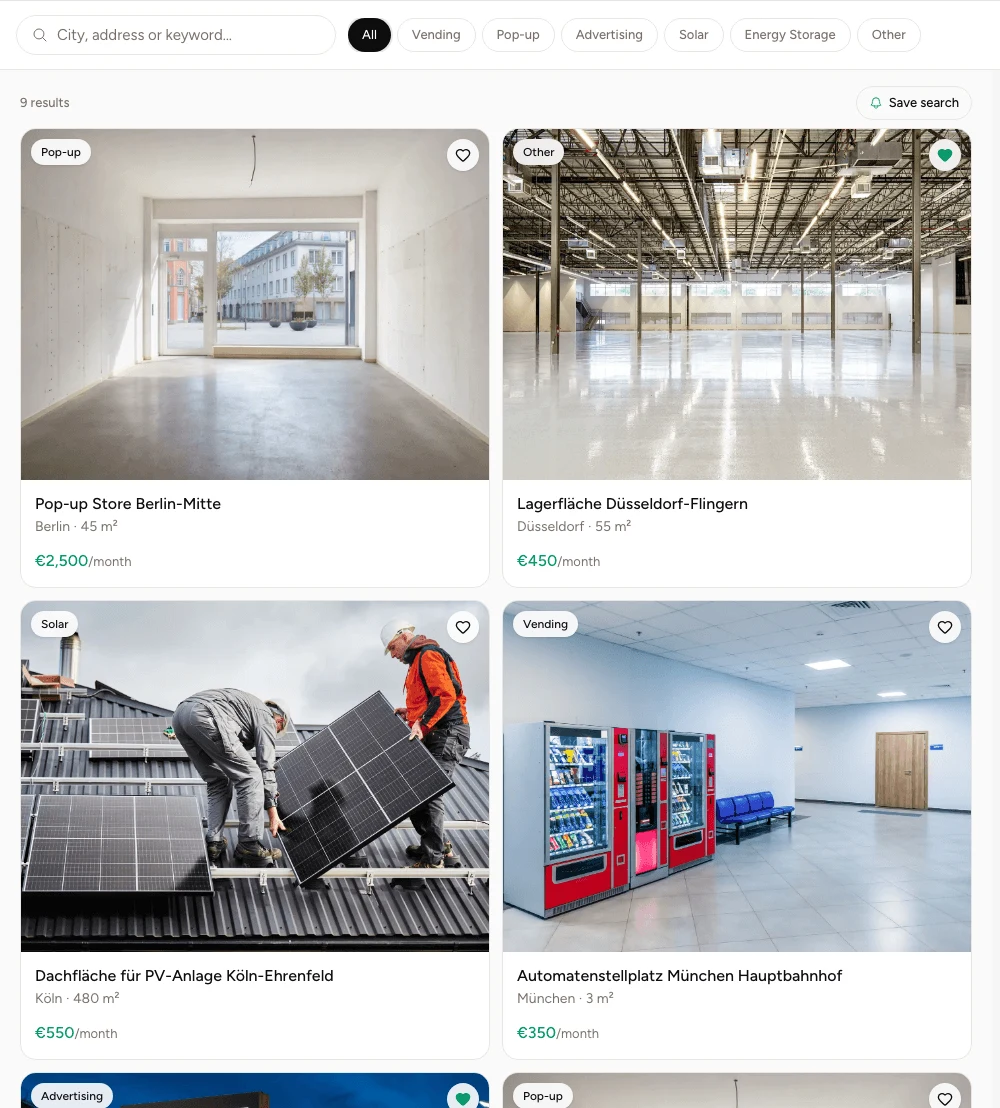
Search lives under Spaces and is where operators spend most of their time. Results on the left, map on the right, and a bar across the top holding the search field and the quick filters.
The bar at the top
The search field takes a place, an address or a term. Next to it sit the use types as quick filters: All, Vending, Pop-up, Advertising, Solar, Energy storage, Other. One click and the list follows.
Those quick filters are a single choice. If you want vending and pop-up side by side, leave All selected and narrow things down elsewhere.
The filter dialog
At the right end of the bar sits Filter. Behind it is everything that does not fit into a quick filter: price range, size, radius around the place you searched for, and fittings such as indoor or outdoor, electricity, grid connection and parking. Access arrangements too.
The price range has a small bar chart behind it showing how the listings spread across that range. Seeing that almost nothing sits above a certain figure saves you from finding that out by trial.
What a result card shows
Photo, use type as a tag, title, city, size and the monthly price. Where no amount appears, the host chose Price on request.
Top right on every card is a heart. It puts the space on your saved list without leaving the search. The saved list covers what that list is for.
The map and its circles
On the right the same set of results appears on the map. Instead of a pin, each space gets a circle a few hundred metres across, and its centre is deliberately not the location.
This is not a rendering fault. The exact address is part of what operators pay for, and a circle you could triangulate with three searches would not be masking anything. Unlocking contact details covers how to get at the real address.
Keeping a search
Above the results sits Save search. It turns the current combination of filters into a search agent that keeps running and tells you when something matching turns up. You can have three at a time, and Creating a search agent covers how to manage them.
Veelgestelde vragen
- Do I need an account to search?
- No. The directory is open. An account is what you need to save spaces, store a search, and unlock contact details.
- Why is there a circle on the map instead of a pin?
- Because the exact address is part of what operators pay for. The circle is deliberately not centred on the location, so nothing can be inferred from it.
- Can I filter by several use types at once?
- The quick filters above the list are a single choice. For combinations of size, price and fittings, use the filter dialog on the right.
- How is the list sorted?
- By relevance to what you typed. With no search term you see the most recently approved spaces first.
- What does price on request mean?
- The host has not set a fixed monthly price. Those spaces appear in the list, just without an amount.