Editing, pausing and deleting a space
What you can still change after approval, how pausing differs from deleting, and what the four tabs under My spaces mean.
· 2 min lesetid
Denne veiledningen finnes på tysk og engelsk. Du leser den engelske versjonen.
Everything to do with a space you have already published lives under My spaces. Each card carries four actions along the bottom: View, Pause, Edit, Delete.
The four tabs
Above the list sit Active, Pending, Suspended and Rejected, each with its count.
- Active: visible in the directory.
- Pending: submitted, not yet reviewed.
- Suspended: taken down by us with a stated reason, which appears on the card.
- Rejected: the images did not pass a content check.
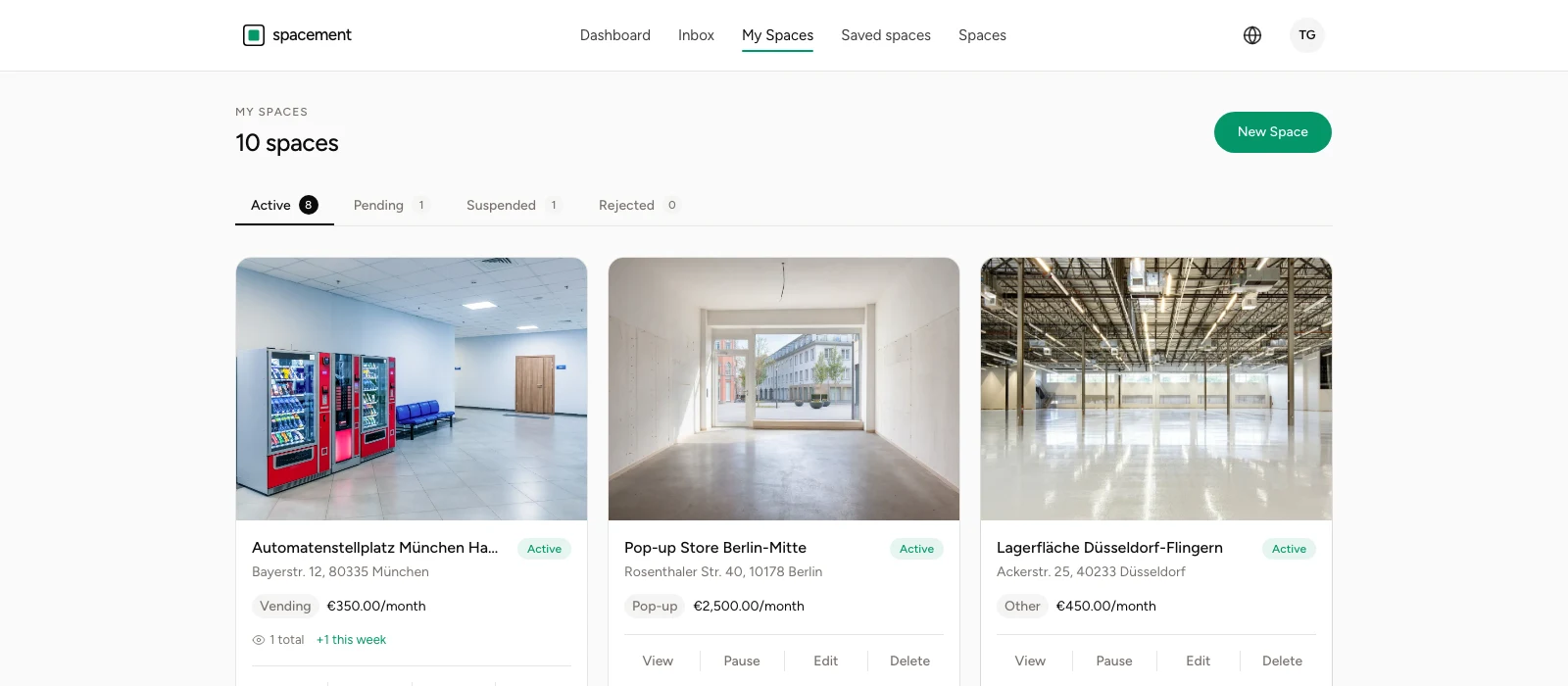
There is no tab for paused spaces, and that is deliberate: pausing does not change the approval state. A paused space stays under Active and carries a grey Paused tag there. It is approved; you have simply made it invisible for now.
Editing
Edit opens the same four-step form as publishing did, filled in with what you wrote. Title, description, use types, details, address, price and photos can all change.
Changes to an approved space go live immediately. They do not run through review again, since that applies to new listings. Convenient, and it correspondingly assumes the details are right when you save.
Two moments are worth an edit: when the price changes, and when you notice which questions enquirers keep asking. Anything asked three times belongs in the description.
Pausing
Pause takes the space out of the directory and out of search. It disappears from result lists and from the map, and anyone who saved it no longer finds it there.
What stays: the space itself with all its details and photos, the approval, and every conversation about it. Resume brings it back with no second trip through review.
That is the thing to reach for when a space is temporarily occupied, when building work is under way, or when you simply do not want more enquiries right now.
Deleting
Delete removes the listing permanently. There is no grace period and no bin.
Use it for spaces that no longer exist or that you will not offer again. For everything else, pausing is the better call, because it keeps the work you put into the description and the photos.
When a space is suspended
If a space sits under Suspended, we took it down and noted the reason on the card. That happens when a report came in and the review found something, or when the details and the photos do not match.
The way back runs through support. Fix what is named, get in touch, and we will look again. Reporting a listing covers how reports come about.
Vanlige spørsmål
- Does an edited space go through review again?
- No. Review applies to new listings. Changes to an approved space are live immediately, which is why they should be right when you save.
- Do operators see that I changed the price?
- There is no notification about changes. Anyone who saved the space sees the new state next time they open it.
- What happens to ongoing conversations when I pause?
- They stay and remain readable. Only the directory and search stop showing the space.
- Can I restore a deleted space?
- No. Deleting is final. If all you need is a break, use Pause.
- Why is there no tab for paused spaces?
- Because pausing does not change the approval state. Paused spaces sit under Active carrying a grey Paused tag.