Delete your account
What happens when you delete your Spacement account, what to do beforehand, and which records stay for legal reasons.
· 2 min de leitura
Este guia está disponível em alemão e inglês. Está a ler a versão inglesa.
You can close your account yourself, under Settings, Data and privacy. The step is final, which is why Spacement asks three times. This guide tells you beforehand what goes and what stays.
First: keep a copy
Once the account is gone, so is your route to the data. If you want to keep it, export it first. That is one click, described in Export your data.
Step by step
- Open Settings and go to Data and privacy.
- Click Delete account at the bottom.
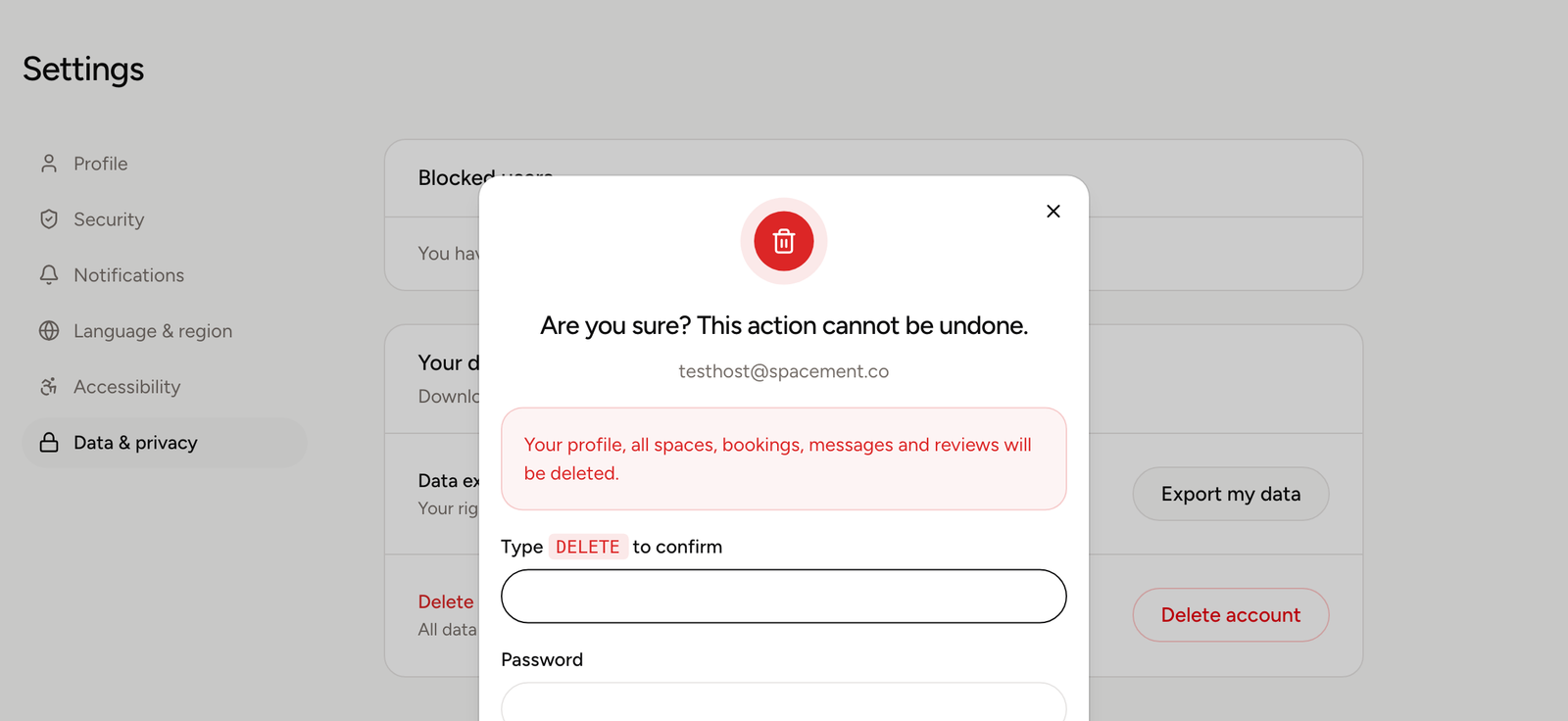
- Type the word DELETE into the field, in capitals, exactly as shown.
- Confirm it is you, with your password, your second factor or an emailed code.
- Click Delete permanently.
Why you have to type a word
A click can happen by accident. A typed word does not. The identity check in the same dialog follows the same idea: an open session alone should not be enough to destroy an account.
What gets deleted
Your profile, your listings and your messages go with the account. Listings leave the directory immediately and their previous links stop working.
A running subscription is cancelled as part of the same step, and your customer record at the payment provider is removed.
What stays
Two things outlast the deletion, both for legal reasons:
- Invoices already issued. Commercial and tax law set retention periods. Those records sit with the payment provider and stay there.
- Evidence in open moderation cases. If there is an unresolved abuse case involving your account, it is anonymised instead of deleted. Your personal details go, the case stays traceable. That protects the other people involved.
If you only need a break
If you want to keep the account but disappear from the directory, deleting is more than you need. As a host you can pause individual listings instead of giving up the whole account.
Perguntas frequentes
- Can I undo it?
- No. Deletion is final. There is no grace period and no recycle bin, which is why exporting your data first is worth the two minutes.
- What happens to my running subscription?
- Spacement cancels it as part of the deletion and removes you at the payment provider. You do not need to cancel separately.
- Do my invoices disappear as well?
- No. Invoices already issued fall under statutory retention rules for commercial and tax records and stay with the payment provider, whether or not your account still exists.
- What about my listings and messages?
- Your listings come out of the directory. Messages you wrote are removed along with your account.