
Creating a search agent
How to save a search so Spacement tells you about matching new spaces, and how to run several agents side by side without drowning in email.
· Время чтения: 2 мин
Это руководство доступно на немецком и английском. Вы читаете английскую версию.
A search agent is a saved search that keeps running while you are away. When a space enters the directory that matches your filters, you hear about it. You create one straight from the search page.
Setting one up
- Open the space search and set the filters you want: location and radius, use type, price, size, indoor or outdoor, electricity, parking, access.
- Click Save search.
- Give the agent a name. It is only for you, and once you have several it is the only thing telling them apart. "Vending Cologne city centre" will help you more later than "Search 1".
- Save. It starts running from there.
Whatever filters are set when you save get carried over. If you later want to search differently, change the filters and save a second agent rather than rebuilding the first.
Three agents side by side
An agent describes one search, not all of them. If you are looking for vending spots in two cities, create two and name them after the cities. That stays clearer than one agent with a radius wide enough to cover both and everything in between.
Three is the ceiling. The overview shows how many are in use, and once all three are taken you delete one to create another.
Managing, pausing, switching off
Your agents live under Search Alerts in the dashboard. You can pause or delete each one, and Pause all quietens the whole set at once.
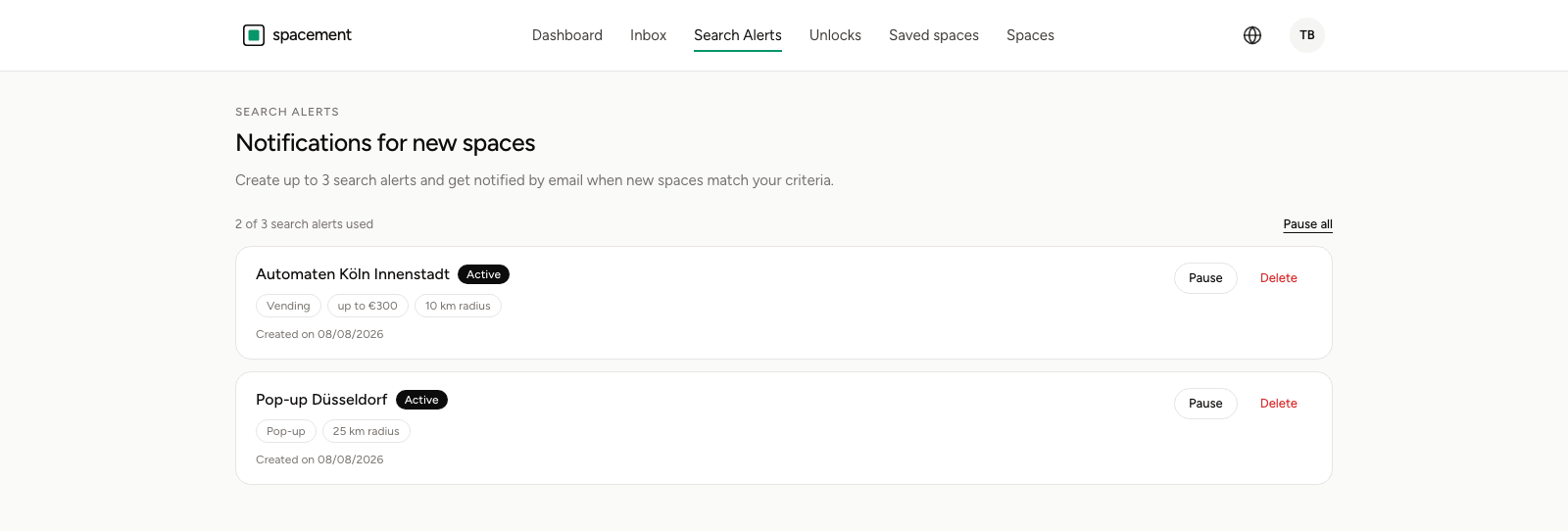
Matches arrive by email. Whether they go out at all is decided elsewhere, by the Search agents category under Settings, Notifications. Turn that off and every agent goes quiet at once, active ones included.
What the alert contains
You learn that a matching space exists, and you see it the way the directory shows it publicly: city, description, photos, price, an approximate circle on the map.
The exact address and the host's contact details are still not included at this point. Those come when you unlock the space. Unlocking contact details covers how that works and what it uses up.
Частые вопросы
- How many search agents can I have?
- Three. Once they are all in use the form says so, and you delete an old one to make room.
- How often will I hear from it?
- Whenever a new space matches your criteria. There is no daily digest and no message when nothing new has come in.
- How does the alert reach me?
- By email. Whether it goes out at all depends on the Search agents category under Settings, Notifications.
- What is the difference between pausing and deleting?
- A paused agent keeps its filters and simply stays quiet. A deleted one is gone. If you just want peace for a while, pause it.
- Does the alert show me the address?
- No. The exact address and the contact details appear once you unlock the space. The alert tells you the space exists.