Accessibility at Spacement
Which display settings exist, the standards we build to, the barriers we know about, and why we do this voluntarily.
· Час читання: 2 хв
Цей посібник доступний німецькою та англійською. Ви читаєте англійську версію.
The footer of every page carries Accessibility. Behind it sits a small panel that adjusts how the site is displayed, no account required.
The four settings
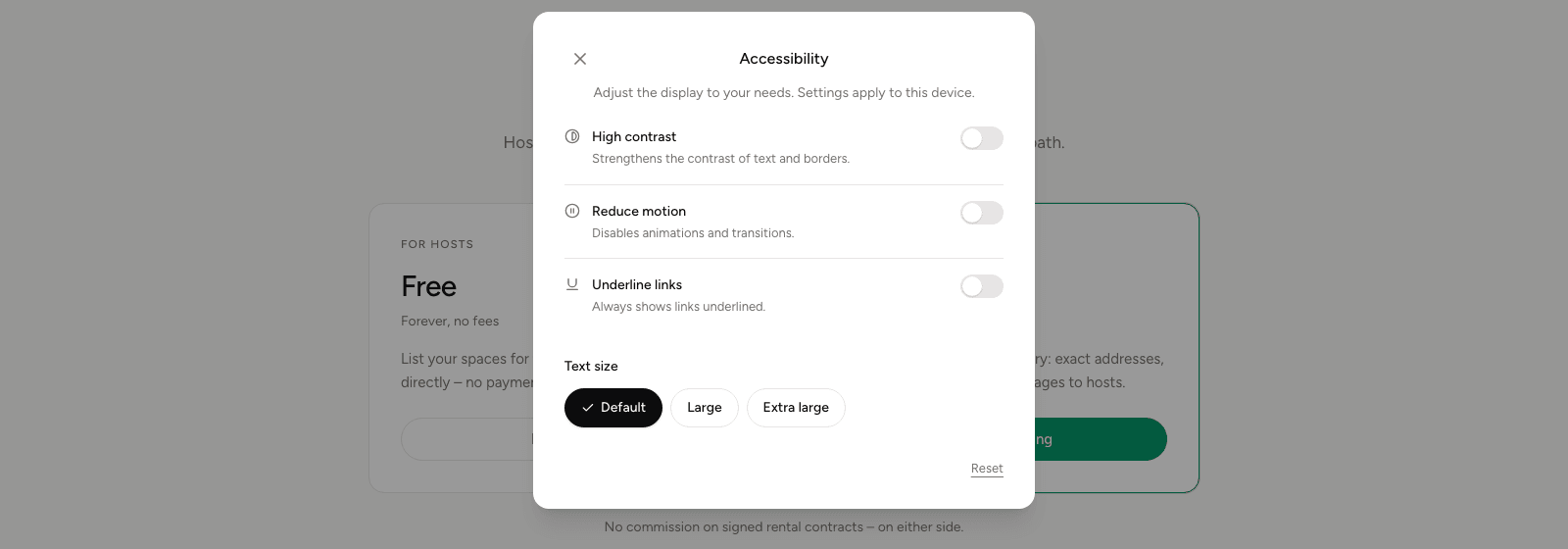
High contrast strengthens the contrast of text and borders. Useful in bright surroundings and for anyone who finds the normal gradation too restrained.
Reduce motion switches off animations and transitions. If your operating system already asks for reduced motion, Spacement honours that by itself; this switch is the additional route.
Underline links shows links underlined at all times. That helps where colour alone is not a reliable distinction.
Text size offers Default, Large and Very large. It is independent of your browser's zoom and leaves the layout intact.
All four apply to the device you set them on rather than to your account. Reset restores the starting state.
What we build to
We develop along the Web Content Accessibility Guidelines 2.1 at level AA and the European standard EN 301 549. In place, among other things: full keyboard operation with a visible focus indicator, a skip link to the page content, semantically marked page regions for screen readers, colour contrasts to AA, form fields with programmatically associated labels and error messages, and a layout that takes 200 per cent magnification without losing anything.
What is not accessible yet
Three limitations are known to us, and we would rather write them down than leave them out.
The interactive map is only partly operable with a screen reader. Every space is reachable through the list view and the search instead, so nothing is lost, but the route via the map is not equivalent.
Photos uploaded by hosts do not always carry descriptive alternative text. The field exists in the form; how conscientiously it gets filled in varies.
Embedded third-party services, payment processing and security checks among them, are partly outside our control.
Why this is voluntary
Germany's accessibility act, the BFSG, covers services aimed at consumers. Spacement serves business customers only and therefore falls outside its scope.
We build to the same standards regardless. The accessibility statement sets that out in detail. It is voluntary information rather than a declaration under § 14 BFSG, so it creates no legal obligations or claims.
The reason is simpler than any legal norm could capture: somebody who wants to let a space or find one should be able to, whatever way they operate a screen.
When something does not work
Write to info@spacement.co or use the contact form. What helps is anything we can reproduce: which page, which assistive technology, what should have happened and what happened instead. We look at every report.
Часті питання
- Do the settings apply across my devices?
- No. They apply to the device you set them on, and they work without an account.
- Does the BFSG apply to Spacement?
- No. Germany's accessibility act covers services to consumers. Spacement serves business customers only.
- Then why build accessibly?
- Because a platform should be usable by everyone, not merely by most. It is a quality decision rather than compliance.
- What do I do if I hit a barrier?
- Write to info@spacement.co or use the contact form. Reported barriers get fixed as quickly as we can manage.
- Do I need to turn on reduced motion?
- Only if you want it on top. If your operating system already asks for reduced motion, Spacement respects that anyway.